How it works
From a long conversation to readable subtitles.
ValoCaptions works in stages. It begins by identifying speech and speakers, then builds a transcript that becomes the basis for the final subtitle delivery. That gives you a clearer place to start when people interrupt, respond quickly or talk at the same time.
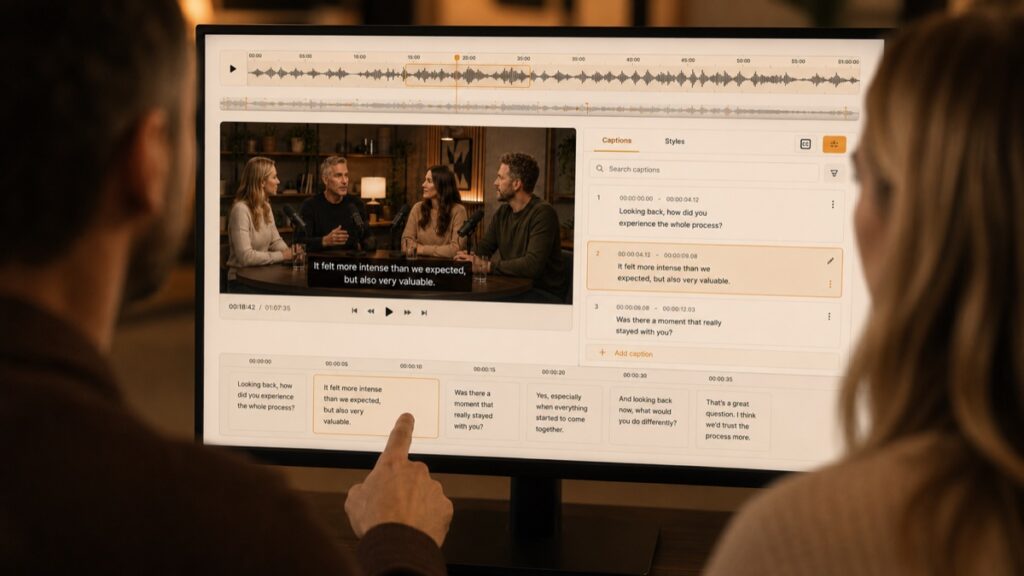
Generate a Basic Transcript
Listen from more than one angle
Several AI models listen to the recording independently. This is called automatic speech recognition, or ASR: it turns spoken audio into text. Comparing independent readings gives the review a stronger basis than relying on one draft alone.
Many automatic subtitle tools start with a single ASR transcript. They do not always use speaker diarisation as a separate review signal, so there is less context when people debate, interrupt one another or speak at the same time.
Make difficult moments visible
Speaker diarisation means identifying who speaks when. ValoCaptions combines transcript sources with those speaker signals to show rapid changes, potential overlap and transcript differences as attention points in the timeline. The result is a time-aligned Basic Transcript, the first verbatim version.
Verbatim means it stays close to what was actually said, including natural spoken language such as repetitions and short reactions. Passages that may need your attention are selected automatically, so you can immediately see where review is most likely to matter.
Work from beginning to end, start with clear passages or return to difficult moments later. You can also mark your own passages for later, set preferred spellings for names, jargon and abbreviations, and flag backchannel words: brief acknowledgements such as “yeah” or “mm-hm”. You keep the editorial decision throughout.
AI supports the process. You direct the result.
Multiple transcript and speaker signals can make passages that may need attention visible. They support your review, but do not decide the final wording, timing or delivery. You keep the editorial decision at every stage.
Generate a Clean Verbatim Transcript
Once you have checked the content, AI creates a cleaner verbatim transcript. It improves spelling, punctuation, grammar and terminology while preserving what was said and meant. It is still faithful to the spoken conversation, just easier to read and use.
You can give this version a short check to remain in control of the process. The Clean Verbatim Transcript can also be downloaded in the file format that suits your workflow.
Build Verbatim Subtitle Cues
The approved Clean Verbatim Transcript is turned into well-timed subtitles. These timed subtitle blocks are called cues. Choose a standard subtitle format or use your own format profile for line length, reading speed, cue duration and timing.
Make text or timing adjustments here when needed, then continue with the version that is right for the delivery.
Generate Clean Read Subtitles
Clean Read is an optional final AI round for comfortable on-screen reading. It can remove unnecessary repetition and shape longer phrasing into a clearer, more natural flow while preserving the approved meaning. This is a different layer from verbatim: it is written to be read as subtitles.
You can give the Clean Read subtitles a final manual check before delivery.
Export and translate
Export the finished subtitles in the file type your delivery requires, or burn them directly into the video. The transcript can also be downloaded, and approved subtitles can be translated into multiple target languages.
Work with your own AI agent
When enabled and agreed for a project, compatible AI agents with tool calling, such as Claude Code, Codex or Cursor, can prepare visible, reversible proposals from the available project context.
You choose whether to accept, edit or reject each proposal. Whether you work manually, with the built-in assistance or with your own AI tools, the editorial decision remains yours.
Questions about the workflow
What are the stages of the workflow?
The workflow starts with a Basic Transcript. Multiple speech-recognition sources and speaker diarisation, which maps who speaks when, give it a broader basis and point out moments that may need attention. You can then turn the checked transcript into timed Verbatim subtitle cues and, if you choose, rewrite those into Clean Read subtitles for a smoother on-screen flow. Finally, download the subtitles and transcript in the format your delivery requires. See the full workflow.
What is speaker diarisation?
Speaker diarisation means identifying who speaks when. ValoCaptions uses speaker changes and possible overlap as review signals alongside multiple transcript sources.
How are passages selected for review?
The software compares multiple AI transcript sources with speaker and overlap signals. Differences and rapid speaker changes can then be shown as attention points in the timeline. They guide review but do not make the final editorial decision.
How is AI used in a project?
AI supports every stage, from the first transcript to the final subtitle layer. Its proposals and changes stay visible in the workflow, so you can steer the work at any point and retain full editorial control over what is approved and delivered. You can also let AI take more of the routine work off your hands while you focus on the decisions that matter.
Do I need to review the recording?
Yes, but you choose how far you take the workflow and how much assistance you use. The stages are designed to take as much routine work as possible off your hands while improving the subtitle result. AI does the heavy lifting; you decide where to review, steer and make the final call.
Can I set preferred spellings for names and jargon?
Yes. You can record preferred spellings for names, jargon and abbreviations, giving the review and later text stages a consistent reference point.
Can I use my own AI tools?
Yes. Use compatible AI tools inside ValoCaptions to work faster on your project. This includes OpenAI Codex, Anthropic Claude Code, Perplexity, OpenCode, Cursor and other tools that support the project workflow. Their proposals remain visible, and you decide what to accept, edit or reject.